PC Expert Services Logo 2026
MacBook Repair Services: Fast, Reliable, and Professional Solutions

MacBook Repair Services: Fast, Reliable, and Professional Solutions

When your Apple MacBook stops working, it can disrupt your business, studies, and daily life. Whether it’s a cracked screen, slow performance, or charging issues, professional repair services can bring your device back to life quickly and efficiently.

Common MacBook Issues We Fix

MacBooks are known for their durability and performance, but like any device, they can develop issues over time. Here are some of the most common problems we handle:

1. Screen Damage & Display Issues

Cracked screens, flickering displays, or dead pixels can make your MacBook unusable. Our technicians provide high-quality screen replacements to restore crystal-clear visuals.

2. Battery Replacement

If your MacBook battery drains quickly or won’t hold a charge, it may be time for a replacement. We install reliable batteries that restore long-lasting performance.

3. Keyboard & Trackpad Repairs

Sticky keys, unresponsive typing, or faulty trackpads can slow you down. We repair or replace components to ensure smooth functionality.

4. Liquid Damage Repair

Spilled coffee or water can cause serious internal damage. Our advanced diagnostics help recover and repair affected components.

Why Choose Professional MacBook Repair?

Choosing a professional repair service ensures:

  • Accurate Diagnosis: Advanced tools identify the root cause quickly
  • Quality Parts: Reliable components for long-term performance
  • Cost Savings: Repairs are often more affordable than replacement
  • Data Protection: Your files and privacy are handled securely

Our Repair Process

We keep things simple and transparent:

  1. Device Drop-Off or Mail-In
  2. Comprehensive Diagnosis
  3. Repair Estimate for Approval
  4. Professional Repair Service
  5. Quality Testing & Pickup

You’ll always know what’s happening with your device—no surprises.

Tips to Extend Your MacBook’s Life

  • Keep your MacBook clean and dust-free
  • Avoid overcharging and overheating
  • Use protective cases and sleeves
  • Keep software updated regularly

Get Your MacBook Back to Peak Performance

A malfunctioning Apple MacBook doesn’t have to slow you down. With expert repair services, you can extend your device’s lifespan and save money compared to buying a new one.

Whether it’s a minor fix or a major repair, professional technicians are ready to help you get back up and running quickly.

Why Timely Repairs Are Important

Delaying laptop repairs can lead to more serious issues. For example, a minor overheating problem can damage internal components if not addressed promptly. Similarly, ignoring software issues may result in data loss or security risks.

Timely repairs not only save money but also ensure that your device continues to perform at its best.

Serving Irvine and Nearby Areas

We proudly serve customers in:

If you’re looking for MacBook laptop repair near you, PC Expert Services is your trusted local solution.

Final Thoughts

A well-maintained Apple MacBook can last for many years—but even the best devices need occasional repair. The key is acting early. Small issues like battery wear, overheating, or minor screen damage can quickly turn into more expensive problems if ignored.

Choosing a professional repair service not only saves you money but also protects your data and ensures your device is handled with care. With the right expertise, your MacBook can be restored to peak performance—often faster and more affordably than you might expect.

At the end of the day, repair is not just about fixing a problem—it’s about extending the life of your investment, minimizing downtime, and keeping your work and personal life running smoothly.

If your MacBook is showing signs of trouble, don’t wait—getting it checked today can save you time, money, and stress tomorrow.

Why is my Mac Slow?

Why is my Mac Slow?

If you find your Mac is running slowly, there are a number of potential causes that you can check.

Your computer’s startup disk may not have enough free disk space. To make disk space available, you can move files to another disk or an external storage device, then delete files you no longer need on the startup disk.

macOS can also help you optimize storage by storing files in the cloud and helping you identify files you no longer need.

Is your computer slow? Keep crashing? We've got a fix
computer-over-heating
An app you’re using may require more memory than your Mac has easily available. To see how much memory your Mac has, choose Apple menu > About This Mac, then check the amount of memory listed in the Overview pane. See the documentation that came with the app to find out its system requirements.

To find out how to increase your computer’s memory, choose Apple menu > About This Mac, click Memory, then click Memory Upgrade Instructions in the lower-right corner. (Not available on all computers.)

Quit any app that isn’t compatible with your Mac. For example, an app may require a different processor or graphics card. See the documentation that came with the app for information about its system requirements.

To see what processor your computer has, choose Apple menu > About This Mac, then click Overview.

To see what graphics card your computer has, choose Apple menu > About This Mac, then click Displays. The name of the graphics card in your computer is displayed in the middle of the window.

Quit any apps you’re not using.

Repair a storage device in Disk Utility on Mac
pcexpertservices computer repair irvine

If you have problems with your disk, use Disk Utility to verify and try and fix any issues.

The following issues may be related to your hard disk:

  • Multiple apps quit unexpectedly
  • Files become corrupt
  • An external drive does not operate properly
  • Your computer doesn’t start up

See the Repair a disk topic in the Disk Utility User Guide.

Conclusion

If your Mac is still slow then take your Mac to PC Expert Services in Irvine for Diagnostics.

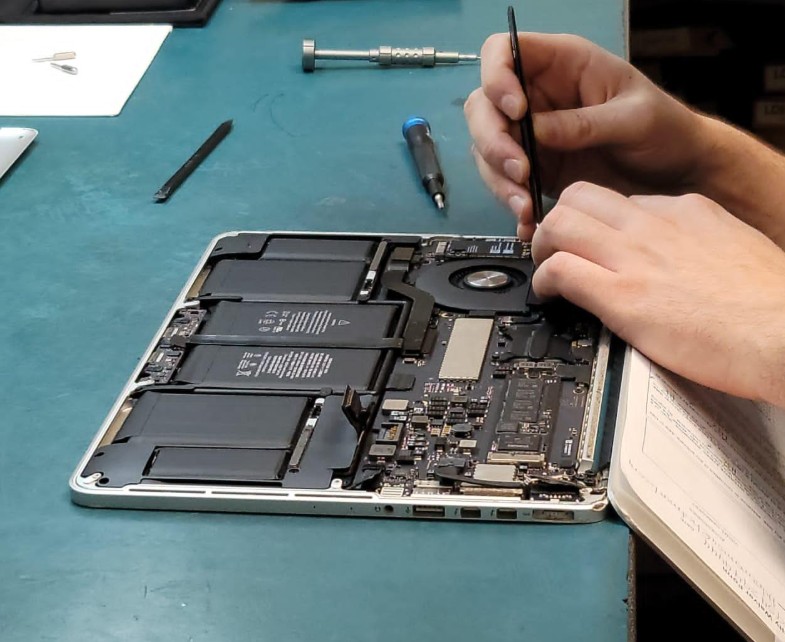
“Please bring in your Mac to PC Expert Services. We highly recommend not to take your PC or laptop apart if you do not know how. Please submit the drop off form at PC Expert Services and bring in your computer for further professional and correct repair.”

Slow Mac, Slow iMac, Slow MacBook, Slow MacBook Pro, Slow MacBook Air, Slow Mac mini, Slow Mac Pro

 ACER Laptop Repair near me

 ASUS Laptop Repair near me

 DELL  Laptop Repair near me

 HP Laptop Repair near me

 Gateway Laptop Reapir near me

 Lenovo Laptop Repair near me

 SONY Laptop Repair near me

 TOSHIBA Laptop Repair near me

 MSI Laptop Repair near me

 Alienware Latpop Repair near me

 Fujitsu Laptop Repair near me

 MacBook Laptop Repair near me

 SAMSUNG Laptop Repair near me

 Republic of Gamers Laptop Repair near me

 Gaming Laptop Repair near me

How to Check for Updates on a Mac?

How to Check for Updates on a Mac?

How to Check for Updates on a Mac?

how-to-check-for-Updates-on-a-mac

Click the Apple button in the upper-left corner of your screen and then clicking About This Mac. You should be staring at the General tab of the About This Mac window. If so, click the Software Update button, which will launch the System Preferences to check for updates.

PC Expert Services provides Mac Certified Repair on MacBook, MacBook Pro, MacBook Air, Mac Pro and iMac computers in Irvine, Orange County. 

MacBook LCD Screen Repair – Irvine – PC Expert Services – PCExpertServices.com

MacBook LCD Screen Repair – Irvine – PC Expert Services – PCExpertServices.com

MacBook LCD Screen and Display Repair Irvine – PC Expert Services

Is your MacBook LCD Screen cracked?

We can Repair and Replace your MacBook LCD Screen and fix your MacBook Display.

MacBook LCD Screen can fail or break for many reasons and can be caused by physical damage, overheating, liquid spills or age. In most cases MacBook LCD Screen problems are fixable by hiring PC Expert Services to repair or replace the MacBook LCD Screen or Display. If your MacBook, MacBook Pro, or MacBook Air exhibits any issues with the LCD Screen, just drop off your MacBook for a FREE evaluation at our Irvine drop off location.

No matter what kind of issues your MacBook LCD Screen Display has, we, at PC Expert Services, can fix your MacBook LCD Screen for a flat-rate in Irvine within 3 to 5 business days.

Drop off your MacBook if you are looking for permanent solutions for your MacBook laptop repair.


Top Reasons to have your repair done by PC Expert Services in Irvine

  • We use grade A+ parts.
  • Quick turnaround time
  • Local Repair done by Apple Certified Tech.
  • 1 Year Limited Warranty on all repairs.

Call or Visit Us

(949) 478-1502

Monday – Friday 9 AM – 6:30 PM
Saturday 9 AM – 1 PM

7545 Irvine Center Drive, Ste. 200
Irvine, CA 92618